Why Is My Shark Steam Mop Not Heating Up?
A Shark steam mop not heating up may need a basic setup check: confirm the outlet, water level, tank fit, and model-specific warm-up time. Unplug it before checking parts.
On this page (9 sections)
- What should you check first if a Shark steam mop is not heating up?
- Is the outlet or power connection the problem?
- Could low water or a loose tank keep the mop from heating?
- Has the mop had enough time to warm up?
- Can the mop pad or floor affect heating?
- What mistakes should you avoid while troubleshooting?
- When should you contact Shark support?
- How can you prevent startup trouble next time?
- Which Shark steam mop should you choose if yours will not heat?
A Shark steam mop not heating up may need a simple setup check before it needs service. Check the outlet, water level, tank fit, and startup time first, then stop if you see damage or the mop still will not heat.
A mop that stays cool can have a power, fill, or setup issue. Internal electrical or heating faults need service, so keep troubleshooting to the steps in your model's guide.
What should you check first if a Shark steam mop is not heating up?
Confirm power, water, and warm-up time before assuming the mop is broken. Follow the startup steps in the owner's guide for your specific model.
- Set the mop upright on a stable, heat-safe surface.
- Check that the plug is fully inserted in a working outlet.
- Check the water level and tank fit, if your model has a removable tank.
- Turn the mop on as directed and allow the full warm-up time.
- Check the indicator light or other signal described in the guide.
Keep your hands dry, and pull the plug by its body rather than the cord. If the outlet or cord looks damaged, stop instead of trying another electrical workaround.
Is the outlet or power connection the problem?
A loose plug or inactive outlet can prevent heating, so check the power source before inspecting the mop. If the plug is secure but there's no sign of power, try a different working outlet only if the manual permits it.
Avoid extension cords and power strips unless Shark's instructions specifically allow them. Use the electrical setup described in the guide, and unplug the mop if a breaker trips.
Don't keep resetting a tripped breaker to test the mop. Repeated trips can point to an electrical problem that needs professional attention.
Could low water or a loose tank keep the mop from heating?
Check that the mop has enough water and that its tank is seated correctly. An empty, misaligned, or unattached removable tank may interrupt normal operation on models that use one.
Unplug the mop and let it cool before refilling or reseating a tank. Don't remove a tank while steam is coming from the mop, and don't fill past the marks or instructions for your model.
Water guidance can vary by model and local water hardness. Read our guide to whether to use distilled water in a steam mop and follow your owner's guide.
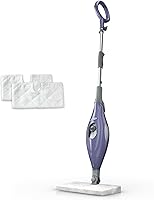
The Shark Steam Mop S1000 suits someone who wants an easy-to-carry mop with a removable tank and two washable pads. Its 30-second heat time is useful for short cleaning sessions, while its corded design means you still need an outlet nearby.
Has the mop had enough time to warm up?
Give the mop the full startup time stated for your model. The S1000 and Steam Pocket Mop S3501 have a 30-second heat time; the SteamSpot S2001 has a 25-second heat time.
Keep the mop upright while it warms, unless its guide says otherwise. Don't touch the mop head or put your hand near a steam outlet to check for heat.
A longer wait won't fix a mop that has no power, shows an error, or behaves unusually. Switch it off and unplug it if the startup steps don't work.
What if a Shark steam mop light is on but there's no steam?
A light may not mean steam is ready yet. Wait through the model's startup period and check the manual for what its indicator means.
Make sure the tank has water and is fitted correctly if removable. If the mop is warm but still produces no steam after the startup steps, switch it off, unplug it, and let it cool.
Don't poke objects into steam outlets or try to clear internal passages. Contact Shark if the guide's basic troubleshooting steps don't resolve the issue.
Can the mop pad or floor affect heating?
A dirty pad can affect cleaning, but it won't explain a mop that never powers on or warms up. If the mop heats but leaves damp or streaky floors, inspect the pad and follow its care instructions.
Use a clean pad that fits your mop head. Our guide to cleaning steam mop pads explains how to wash and dry them between uses.
For setup and safe operation, see how to use a Shark steam mop. It can help you separate a startup problem from a cleaning result problem.
The Steam Pocket Mop S3501 suits longer sessions where flipping a double-sided pad is useful. Choose it if that pad style matters to you; skip it if you prefer a mop with an adjustable steam level.
What mistakes should you avoid while troubleshooting?
Don't open the mop, bypass a safety feature, or work on it while plugged in. Steam and hot surfaces can burn you, and the cord and internal parts can create an electrical hazard.
- Don't touch the mop head or steam outlet during or just after use.
- Don't run the mop without water if its guide requires a filled tank.
- Don't add cleaners, fragrance, or other liquids unless the guide approves them.
- Don't immerse the appliance or its cord in water.
- Don't keep using a frayed cord, cracked body, or leaking unit.
Let the mop cool fully before storing it or checking removable parts. If it leaks near electrical components, smells burnt, or trips a breaker, unplug it if safe and stop using it.
When should you contact Shark support?
Contact Shark if the mop still will not heat after the manual's safe checks. Share the model number, what the power or indicator lights do, and which steps you have already tried.
Don't attempt an internal repair or repeatedly switch the mop on. Shark support can advise you on service options for your model and its current coverage.
For a replacement, compare tank style, pad type, steam controls, and startup time. The Shark SteamSpot S2001 offers 3 steam modes and a removable tank, but buying a new mop won't repair a faulty one.
The SteamSpot S2001 suits homes where light, normal, and deep modes or targeted steam for stuck-on messes would be useful. Its 25-second heat time is the shortest of these three models; skip it if you only need a simple mop for quick, routine floor cleaning.
How can you prevent startup trouble next time?
Follow the fill, setup, and cool-down steps in your model's guide each time. Use the recommended water, keep the mop upright for startup as directed, and empty or store it as instructed.
Before cleaning, check that the tank is seated and the cord reaches the outlet without crossing a wet area. Keep the mop and plug dry, and use a clean pad suited to the floor.
For a broader look at choosing a floor steamer, read steam cleaners for floors. It can help you decide whether a steam mop fits your sealed floors and cleaning routine.
Which Shark steam mop should you choose if yours will not heat?
Choose the S1000 for a removable tank and lightweight design, the S3501 for double-sided pads, or the SteamSpot S2001 for 3 steam modes and targeted steam. If your current mop simply stopped heating, contact Shark before replacing it.
The S1000 and S3501 each need 30 seconds to heat; the SteamSpot takes 25 seconds. Compare the pad and control styles against the way you clean, then follow the chosen model's setup instructions from its first use.
Frequently asked questions
Why is my Shark steam mop not heating up?
A loose plug, inactive outlet, low water, or too little warm-up time can make a Shark steam mop seem unresponsive. Check the model's manual, unplug it before inspecting connections, and allow its stated warm-up time.
If it still won't heat, stop using it and contact Shark support.
How long does a Shark steam mop take to heat up?
Warm-up time depends on the model. The Shark Steam Mop S1000 and Shark Steam Pocket Mop S3501 have a 30-second heat time, while the Shark SteamSpot S2001 has a 25-second heat time.
Follow your model's manual for startup and indicator-light instructions.
Can I use tap water in a Shark steam mop?
Water guidance can vary by model and local water hardness, so follow the owner's guide for your mop. If you are unsure about your water, read our guide to distilled water in a steam mop and check Shark's instructions before changing water types.
Should I keep using a Shark steam mop that won't heat?
No. Unplug the mop and stop troubleshooting if you notice a damaged cord, burning smell, unusual heat, leaking near electrical parts, or a tripped breaker.
Don't open the housing or try to repair internal wiring.
Contact Shark support or a qualified service professional.